
Search
Supercharged plan users have the capability to seamlessly integrate DeveloperHub with Google Analytics, allowing you to effectively track page views. This integration supports both Universal Analytics and Google Analytics 4 IDs, giving you flexibility in your analytics setup.
Setting up Google Analytics
Click on Project Settings in the sidebar to access Google Analytics settings under Integrations for Customers.
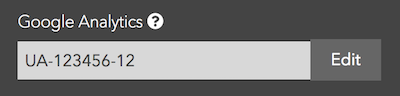
You should already have a property for the documentation subdomain on Google Analytics.
Paste the tracking code from Google Analytics. Universal Analytics IDs look like
UA-XXXXXX-YY. Google Analytics 4 IDs look likeG-XXXXXXXX.Type it in the input field and save.
Congratulations
You can track page views on Google Analytics now.
Was this page helpful?