
What is Markdown?
Markdown is a lightweight markup language with plain text formatting syntax. It is widely used for formatting README files, documentation, and comments all around the web. Using it is simple and fast.
How to use Markdown?
If you are a technical person, then you'd probably love to be able to write your documentation in Markdown.
DeveloperHub seamlessly supports Markdown. Write in Markdown and we will transform it right away.
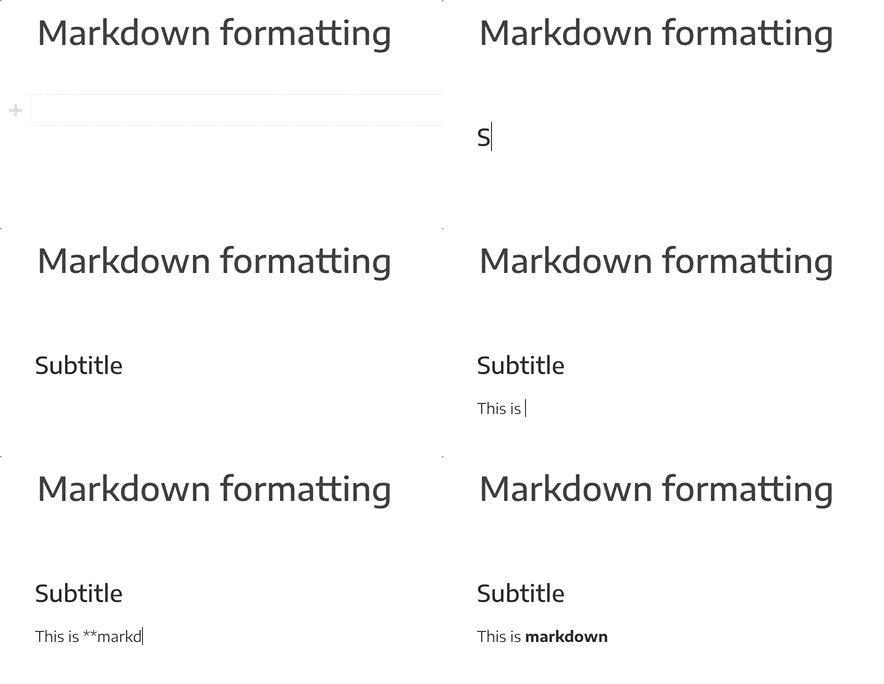
We currently support:
Heading 2, Heading 3 and Heading 4 using
## H2,### H3and#### H4Bold text using
**text**Italic text using
*text*or_text_Links using
[title](URL)Code blocks by starting a line with triple quotes
Inline code by surrounding text with backticks (`)
Callouts by starting a line with
>and a spaceSeparators by starting a line with
---Unordered lists by starting a line with
*or-and a spaceOrdered lists by starting a line with
1.and a space. You can also continue numbering by starting a line with any number, a dot then a space.Tables by starting a line with
|and a space
Lists can be indented and outdented using Tab and Shift+Tab.
To escape back tick, you need to disable live markdown formatting and type two back ticks, your expression, then two back ticks. For example: abc ` def
Pasting Markdown
If you are pasting raw Markdown from an external source, then it might not render immediately. Do not worry. Once you save the page and refresh it, formatting will render correctly. Note that this does not work for code blocks or tables.
Disable Live Markdown Rendering
If Markdown live rendering is getting in your way when having content alike to Markdown, then you can disable Live Markdown Rendering from your Account Settings.
More Markdown?
Talk to us and tell us what you need!